
Honesty for Agents.

Keep every agent anchored to the right repository, revision, and reviewed next task.

A small local CLI for durable handoffs between sessions. Git-only stays fully supported; Muse is an explicit repository choice.

$ ok -C . status --json 
branch: main · NEXT digest: 7ac9…
$ ok -C . next  
context matches · print reviewed task 
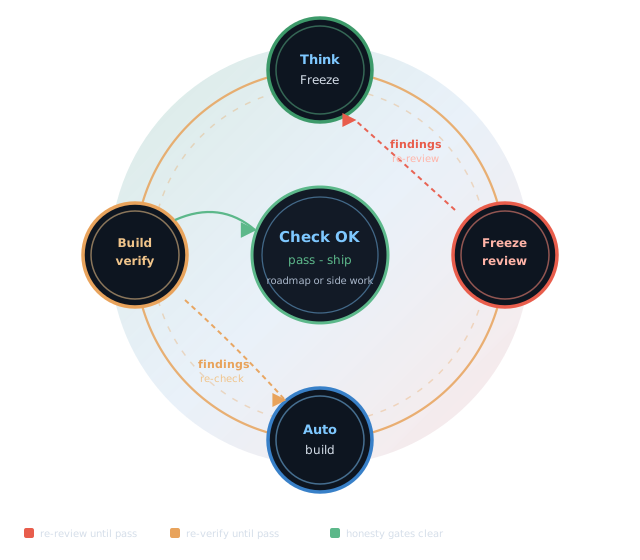
Original Overseer honesty-loop illustration; a conceptual workflow rather than an automated v1 command sequence

Trusted NEXT

  • One handoff — next validates and prints the repository’s sole current task.
  • Exact context — copied configuration, a foreign handoff, or a stale revision refuses closed.
  • Your agent stays yours — Overseer prints task text; it never executes the prompt or chooses the work.
Repository · Revision · NEXT

  • Repository — a persistent UUID and exact physical root bind the local configuration.
  • Revision — freshness follows the current Git commit or selected Muse revision.
  • NEXT — one canonical handoff carries the reviewed task and its context.
  • Replacement — next-write requires the previous NEXT digest and explicit current context.

The failure mode

Why governance honesty matters

AI-assisted work breaks down when a new session starts from the wrong context.

Overseer Kit makes context visible before work continues — a local handoff tool, not a hosted agent or workflow engine.

The loop

How it works

Bind the repository, inspect current status, read the trusted handoff, and replace it deliberately.

  1. Initialize explicitly

    Bind one authorized checkout to its persistent identity, physical root, authority, lane, and model label.

  2. Check status

    See the active repository, authority, branch, revision, runtime pin, and current NEXT digest.

  3. Read trusted NEXT

    Validate and print the task for your agent. Overseer does not execute it or decide whether it is good.

  4. Replace deliberately

    Review new task text, then publish it against the current revision and the exact prior NEXT digest.

Structure at a glance

The original diagrams remain as working metaphors. The captions below state the bounded-v1 contract that ships.

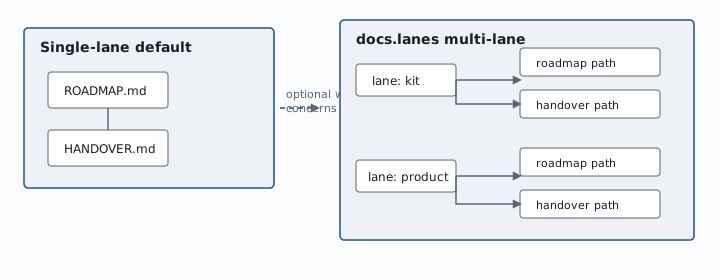
One trusted handoff is bound to one repository context; lane is an explicit label inside it.
Original work-lanes illustration, used here as a conceptual view of repository context and one trusted handoff
  • Repository identity + physical root + current revision
  • One lane label and one trusted NEXT handoff
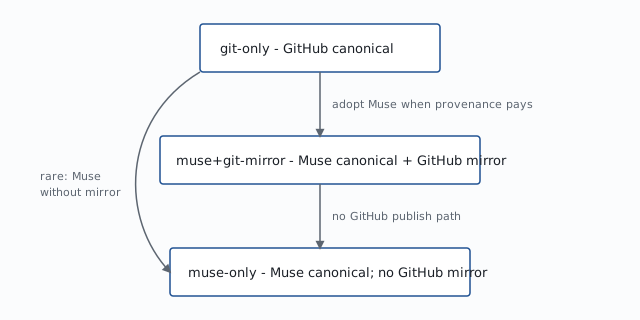
Git-only is permanently supported. Muse authority, with or without a controlled GitHub mirror, is an explicit choice.
Version-control options from git-only to Muse with GitHub mirror to Muse-only
  • git-only — permanent mode; no Muse required
  • muse+git-mirror — Muse authority + controlled GitHub mirror
  • muse-only — Muse authority; no GitHub mirror
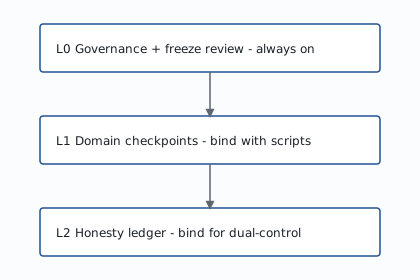
Context validation has three layers: repository identity, current authority and revision, then NEXT context and digest.
Original safety-layer illustration, representing repository, revision, and NEXT context checks
  • Repository — persistent identity and physical root
  • Authority — selected VCS, branch, and revision
  • NEXT — bound context and previous digest
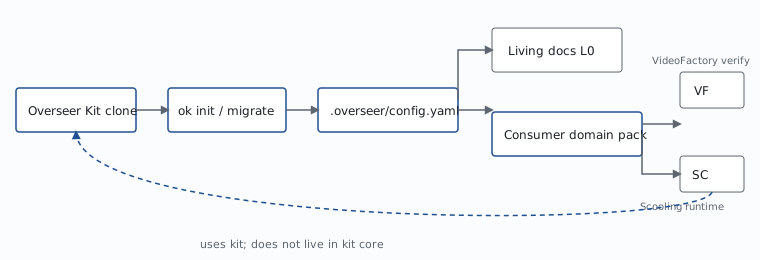
The verified kit initializes or adopts a repository, installs a bound launcher, and validates NEXT for your agent.
Original kit-and-consumer illustration, representing verified source, explicit setup, repository binding, and an agent handoff
  • Verified kit → explicit init or adopt → bound config
  • Validated NEXT → your agent; product checks stay in your repository

Get started

This site is informational. Install the local CLI from the reviewed release, then choose Git or Muse authority for a repository you are authorized to manage.

Path 1 — Git-only permanent · no account

  1. Follow the reviewed v1.0.0-rc.1 INSTALL-AND-ROLLBACK.md guide.
  2. Set PROJECT_ROOT to an existing Git checkout you are authorized to initialize.
  3. Run ./cli/ok for init --vcs git with the required repository name and context.
  4. Use the repository-bound launcher for status, next, and a reviewed next-write.

Git-only is a complete ongoing mode. It requires no Muse installation, account, or future migration.

Path 2 — Muse authority (adopt)

  1. Read the Muse adoption and rollback guide before changing repository authority.
  2. Prepare the separate pinned Muse environment; Muse is not required by the core install.
  3. Preview adopt and confirm the repository identity, root, branch, and revision.
  4. Apply the authority change explicitly; Muse metadata alone never changes a Git binding.

Path 3 — Muse + GitHub mirror

  1. Prepare and verify the controlled projection with mirror; inspect source and destination identities.
  2. Explicit delivery may push the mirror and open a pull request. It never merges the pull request.

Overseer is bound to one local checkout. It prints a task; it does not execute the prompt, judge the task, or merge code.

Operator detail: Installation and rollback · Release index: v1.0.0-rc.1 · Git guide: Git-only quickstart

Muse when it fits the repository

Git-only remains a complete ongoing mode. Muse can become the explicit repository authority, with or without a controlled GitHub mirror. The choice belongs to each repository.

Where to go next

This site explains the bounded local CLI. Day-to-day agent work stays in your existing tools.

GitHub

overseer-kit — source, issues, and release history.

Release

After reviewing v1.0.0-rc.1: Open the release — see Get started.

Scenarios

Scenario gallery — the original job flows, clearly labeled as examples.

Install the CLI → Bind one repository → Read trusted NEXT

Scenarios

The original persona flows remain, with copy that separates shipped CLI behavior from illustrative domain practice.

Open the scenario gallery →